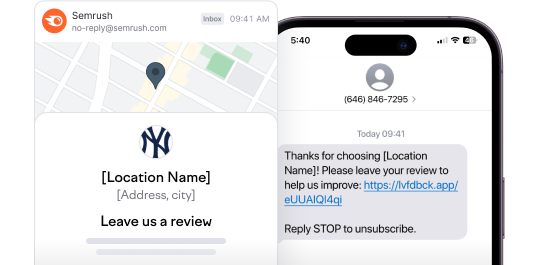
The number of Google reviews is a critical factor for local business rankings and building trust with local customers. However, consistently acquiring new reviews can be a challenge. Semrush Local's Review Generation feature automates this process, helping businesses proactively solicit customer feedback without the extra effort.
What is Review Generation?
Review Generation is a feature within Semrush Local's Review Management that allows users to automatically SMS or email review requests after a service or purchase, directly increasing the number of reviews your business receives.
Why is Review Generation Important for Your Business?
- Improved local rankings: The number of Google reviews is one of the top-5 ranking factors in local search. Actively generating new reviews directly increases your chances of outranking competitors and improving your local search visibility.
- Enhanced reputation and trust: The majority of reviews generated through this feature are positive, which directly impacts your average review star-rating—another top-5 ranking factor. Consistent positive reviews build credibility and trust with potential customers.
- Increased engagement: More new reviews provide more opportunities to respond to customer feedback, which is an important ranking factor for Google and enhances customer engagement.
How to Use Review Generation
To launch a review generation campaign:
- Subscription requirement: Ensure you have an active Semrush Local Essentials or Pro subscription.
- Access the feature: Navigate to the "Review Generation" tab located within the "Review Management" section of your Semrush Local dashboard.
- Upload client contacts: Upload your client contact data. Currently, manual entry or file upload is available. Even 20-30 contacts can lead to noticeable review growth.
- Choose campaign format: Select your preferred communication channel(s): SMS and/or email.
- Select template: Choose one of the pre-designed text/email templates. Semrush templates are designed to be client-friendly, adhering to all platform rules.
- Launch campaign: Once configured, launch your review generation campaign. Uploading contacts typically takes about 5 minutes, and campaigns can be automated.
Key Capabilities
- AI-powered templates: Semrush templates are designed to follow best practices and help you generate quality content quickly.
- Google's guidelines: Google officially permits businesses to request reviews, provided no incentive is offered. Our templates are designed to comply with these rules.
- High response rates: On average, review requests sent within 24 hours of service see a 10-30% response rate, significantly higher than organic review rates.
- Data privacy: Semrush only uses customer data to send review requests. Users must accept a data processing agreement, and the process is fully GDPR compliant.
Pricing and Access
The Review Generation feature is available to users with the following Semrush Local plans:
- Local Pro: Full access with limits of 1500 emails and 80 SMS per month.
- Local Essentials: Available with 50% of the Pro limits: 750 emails and 40 SMS per month.
Supported countries include the USA, UK, Australia, Germany, and France.
 Back to Semrush Toolkits category